
One common feature in Vault and Productstream that is commonly overlooked is the ability track a project milestone with labels. Labels will allow you to revert back to a files snapshot as it was when the snapshot was taken, or to export the label as a "Pack & Go".
Take a look at an example here:
Watch Video Here
Contributed by Ben of the INCAT CAD Geeks


I was talking with a new user of AutoCAD Electrical yesterday and he was in the process of configuring the look and feel of AutoCAD Electrical. One area that he needed to change was how the column heading information appeared on the Bill of Material. So let’s quickly run through the steps:
1. Run your BOM report as usual
2. When the report is displayed click on – Change Report Format
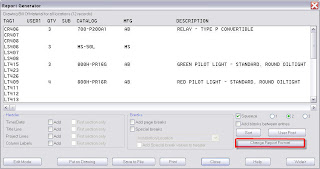
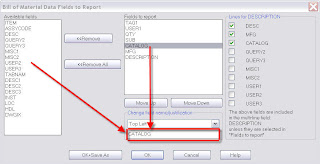
3. From the left window pane select any of the fields in my example – Catalog
4. In the middle of the dialog box near the bottom you will find Change Field Name/Justification, here you will see the field you selected to change
5. Type in the new text you want the column displayed as
6. Click OK
Let's take a look
http://www.screencast.com/t/4LqAYLpI
Created by Dave one of the Cad Geeks

For this post I wanted to highlight a couple of commands that are a great reason to be using the AutoCAD Mechanical software.
Power Copy: This command allows you to copy Mechanical objects that are placed in your drawing all at the same time and all of their intelligence goes with each copy.
Power View: This command allows you to create a projected view of Mechanical objects based on their intelligence.
Enjoy,
Jim ... INCAT

A seemingly simple question was asked today by one of our long time clients. The question - When a view is created, how do you know where the file is (directory) so you can locate the file or files? Well, that seems like it would be easy. Let's take a look at some of the ways that you can determine where the file is located....
Thanks to Dave Phillips at Advanced Design Solutions
John With the INCAT CAD Geeks
What would it be worth to be able to go back to earlier versions of files? Easily re-use existing designs and drawings without spending hours gathering and relinking design files or re-creating Inventor drawings? All without any extra Vault overhead while using your Autodesk CAD software of choice.
Thats the topic of today's blog post: NO OVERHEAD VAULT USE
By utilizing the Vault options within the Autodesk CAD applications, you can configure Vault to be almost completely transparent to the CAD user (they will only see a brief splash screen when files are automatically check out or checked in). Take a look at this video for an example of this Vault workflow in Autodesk Inventor and the settings in the options dialog box to configure it to work this way.
Contributed by Ben of the INCAT CAD Geeks


